

Semantic search#
This guide gives an overview of the semantic search features. Since 1.2.0 Argilla supports adding vectors to Argilla records which can then be used for finding the most similar records to a given one. This feature uses vector or semantic search combined with more traditional search (keyword and filter based).
Vector search leverages machine learning to capture rich semantic features by embedding items (text, video, images, etc.) into a vector space, which can be then used to find “semantically” similar items.
In this guide, you’ll find how to:
Setup your Elasticsearch or Opensearch endpoint with vector search support.
Encode text into vectors for Argilla records.
Use semantic search.
The next section gives a general overview about how semantic search works in Argilla.
How it works#
Semantic search in Argilla works as follows:
One or several vectors can be included in the
vectorsfield of Argilla Records. Thevectorsfield accepts a dictionary wherekeysrepresent names andvaluesthe actual vectors. This is the case because certain use cases might require using several vectors.The vectors are stored at indexing time, once the records are logged with
rg.log.If you have stored vectors in your dataset, you can use the semantic search feature in Argilla UI or the
vectorparam in therg.loadmethod of the Python Client.
In future versions, embedding services might be developed to facilitate steps 1 and 2 and associate vectors to records automatically.
Note
It’s completely up to the user which encoding or embedding mechanism to use for producing these vectors. In the “Encode text fields” section of this document you will find several examples and details about this process, using open source libraries (e.g., Hugging Face) as well as paid services (e.g., Cohere or OpenAI).
Currently, Argilla uses vector search only for searching similar records (nearest neighbours) of a given vector. This can be leveraged from Argilla UI as well as the Python Client. In the future, vector search could be leveraged as well for free text queries using Argilla UI.
Setup vector search support#
In order to use this feature you should use Elasticsearch at least version 8.5.xor Opensearch 2.2.0. We provide pre-configured docker-compose files in the root of Argilla’s Github repository.
Warning
If you had Argilla running with Elasticsearch 7.1.0 you need to migrate to at least version 8.5.x. Please check the section “Migrating from Elasticsearch 7.1.0 to 8.5.x”
Opensearch backend#
If you don’t have a another instance of Elasticsearch or Opensearch running, or don’t want to keep previous Argilla datasets, you can launch a clean instance of Opensearch by running:
docker-compose -f docker-compose.opensearch.yaml up
Once the service is up you can launch the Argilla Server with python -m argilla.
Elasticsearch backend#
If you don’t have a another instance of Elasticsearch or Opensearch running, or don’t want to keep previous Argilla datasets, you can launch a clean instance of Elasticsearch by running:
docker-compose -f docker-compose.elasticsearch.yaml up
Once the service is up you can launch the Argilla Server with python -m argilla.
Migrate from 7 to 8.5#
Warning
If you had Argilla running with Elasticsearch 7.1.0 you need to migrate to at least version 8.5.x. Before following the process described below, please read the official Elasticsearch Migration Guide carefully.
In order to migrate from Elasticsearch 7.1.0 and keep your datasets you can follow this process:
Stop your current Elasticsearch service (we assume a migration for a
docker-composesetup).Set the the Elasticsearch image to 7.17.x in your
docker-compose.Start the Elasticsearch service again.
Once is up and running, stop it again and set the Elasticsearch image to 8.5.x
Finally, start again the Elasticsearch service. Data should be migrated properly.
Add vectors to records#
The first and most important thing to do before leveraging semantic search is to turn text into a numerical representation: a vector. In practical terms, you can think of a vector as an array or list of numbers. You can associate this list of numbers with an Argilla Record by using the aforementioned vectors field. But the question is: how do you create these vectors?
Over the years, many approaches have been used to turn text into numerical representations. The goal is to “encode” meaning, context, topics, etc.. This can be used to find “semantically” similar text. Some of these approaches are: LSA (Latent Semantic Analysis), tf-idf, LDA (Latent Dirichlet Allocation), or doc2Vec. More recent methods fall in the category of “neural” methods, which leveragage the power of large neural networks to embed text into dense vectors (a large array of real numbers). These methods have demonstrated a great ability of capturing semantic features. These methods are powering a new wave of technologies that fall under categories like neural search, semantic search, or vector search. Most of these methods involve using a large language model to encode the full context of a textual snippet, such as a sentence, a paragraph, and more lately larger documents.
Note
In the context of Argilla, we intentionally use the term vector in favour of embedding to emphasize that users can leverage methods other than neural, which might be cheaper to compute, or be more useful for their use cases.
In the next sections, we show how to encode text using different models and services and how to add them to Argilla records.
Warning
If you run into issues when logging records with large vectors using rg.log, we recommend you to use a smaller chunk_size as shown in the following examples.
Sentence Transformers#
SentenceTransformers is a Python framework for state-of-the-art sentence, text and image embeddings. There are dozens of pre-trained models available on the Hugging Face Hub.
The code below will load a dataset from the Hub, encode the text field, and create the vectors field which will contain only one key (mini-lm-sentence-transformers).
Note
Vector keys are arbitrary names that will be used as a name for the vector and shown in the UI if there’s more than 1 so users can decide which vector to use for finding similar records. Remember you can associate several vectors to one record by using different keys.
Warning
Due to the vector dimension limitation of Elasticsearch and Opensearch Lucene-based engines, currently, you cannot register vectors with dimensions greater than 1024.
To run the code below you need to install sentence_transformers and datasets with pip: pip install sentence_transformers datasets
[ ]:
from sentence_transformers import SentenceTransformer

from datasets import load_dataset

# Define fast version of sentence transformers
encoder = SentenceTransformer("all-MiniLM-L6-v2", device="cpu")

# Load dataset
dataset = load_dataset("banking77", split="test")

# Encode text field using batched computation
dataset = dataset.map(lambda batch: {"vectors": encoder.encode(batch["text"])}, batch_size=32, batched=True)

# Turn vectors into a dictionary
dataset = dataset.map(
    lambda r: {"vectors": {"mini-lm-sentence-transformers": r["vectors"]}}
)
Our dataset now contains a vectors field with the embedding vector generated by the sentence transformer model.
[4]:
dataset.to_pandas().head()
[4]:
| text | label | vectors | |
|---|---|---|---|
| 0 | How do I locate my card? | 11 | {'mini-lm-sentence-transformers': [-0.06855544... |
| 1 | I still have not received my new card, I order... | 11 | {'mini-lm-sentence-transformers': [-0.16821901... |
| 2 | I ordered a card but it has not arrived. Help ... | 11 | {'mini-lm-sentence-transformers': [-0.17539088... |
| 3 | Is there a way to know when my card will arrive? | 11 | {'mini-lm-sentence-transformers': [0.072342686... |
| 4 | My card has not arrived yet. | 11 | {'mini-lm-sentence-transformers': [-0.25441116... |
This dataset can be transformed into an Argilla Dataset by using the DatasetForTextClassification.from_datasets method. Then, this dataset can be logged into Argilla as follows:
[ ]:
import argilla as rg

rg_ds = rg.DatasetForTextClassification.from_datasets(dataset, annotation="label")

rg.log(
    name="banking77",
    records=rg_ds,
    chunk_size=50,
)
OpenAI Embeddings#
OpenAI provides a API endpoint called Embeddings to get a vector representation of a given input that can be easily consumed by machine learning models and algorithms.
Warning
Due to the vector dimension limitation of Elasticsearch and Opensearch Lucene-based engines, currently you can only use the text-similarity-ada-001 model which produces vectors of 1024 dimensions.
The code below will load a dataset from the Hub, encode the text field, and create the vectors field which will contain only one key (openai) using the Embeddings endpoint.
To run the code below you need to install openai and datasets with pip: pip install openai datasets.
You also need to setup your OpenAI API key as shown below.
[ ]:
import openai
from datasets import load_dataset

openai.api_key = "<your api key goes here>"

# Load dataset
dataset = load_dataset("banking77", split="test")

def get_embedding(texts, model="text-similarity-ada-001"):
    response = openai.Embedding.create(input = texts, model=model)
    vectors = [item["embedding"] for item in response["data"]]
    return vectors

# Encode text. Get only 500 vectors for testing, remove the select to do the full dataset
dataset = dataset.select(range(500)).map(lambda batch: {"vectors": get_embedding(batch["text"])}, batch_size=16, batched=True)

# Turn vectors into a dictionary
dataset = dataset.map(
    lambda r: {"vectors": {"text-similarity-ada-001": r["vectors"]}}
)
[142]:
dataset.to_pandas().head()
[142]:
| text | label | vectors | |
|---|---|---|---|
| 0 | How do I locate my card? | 11 | {'text-similarity-ada-001': [0.022019268944859... |
| 1 | I still have not received my new card, I order... | 11 | {'text-similarity-ada-001': [0.048648588359355... |
| 2 | I ordered a card but it has not arrived. Help ... | 11 | {'text-similarity-ada-001': [0.063740141689777... |
| 3 | Is there a way to know when my card will arrive? | 11 | {'text-similarity-ada-001': [0.044162672013044... |
| 4 | My card has not arrived yet. | 11 | {'text-similarity-ada-001': [0.054131150245666... |
[ ]:
import argilla as rg

rg_ds = rg.DatasetForTextClassification.from_datasets(dataset, annotation="label")

rg.log(
    name="banking77-openai",
    records=rg_ds,
    chunk_size=50,
)
co:here Co.Embed#
Co:here Co.Embed is an API endpoint by Cohere which takes a piece of text and turns it into a vector embedding.
Warning
Due to the vector dimension limitation of Elasticsearch and Opensearch Lucene-based engines, currently you can only use the small model which produces vectors of 1024 dimensions.
The code below will load a dataset from the Hub, encode the text field, and create the vectors field which will contain only one key (cohere) using the Embeddings endpoint.
To run the code below you need to install cohere and datasets with pip: pip install cohere datasets.
You also need to setup your Cohere API key as shown below.
[ ]:
import cohere

api_key = "<your api key goes here>"
co = cohere.Client(api_key)

# Load dataset
dataset = load_dataset("banking77", split="test")

def get_embedding(texts):
    return co.embed(texts, model="small").embeddings

# Encode text. Get only 1000 vectors for testing, remove the select to do the full dataset
dataset = dataset.select(range(1000)).map(lambda batch: {"vectors": get_embedding(batch["text"])}, batch_size=16, batched=True)

# Turn vectors into a dictionary
dataset = dataset.map(
    lambda r: {"vectors": {"cohere-embed": r["vectors"]}}
)
[ ]:
import argilla as rg

rg_ds = rg.DatasetForTextClassification.from_datasets(dataset, annotation="label")

rg.log(
    name="banking77-cohere",
    records=rg_ds,
    chunk_size=50,
)
Use semantic search#
This section introduces how to use the semantic search feature from Argilla UI and Argilla Python client.
Argilla UI#
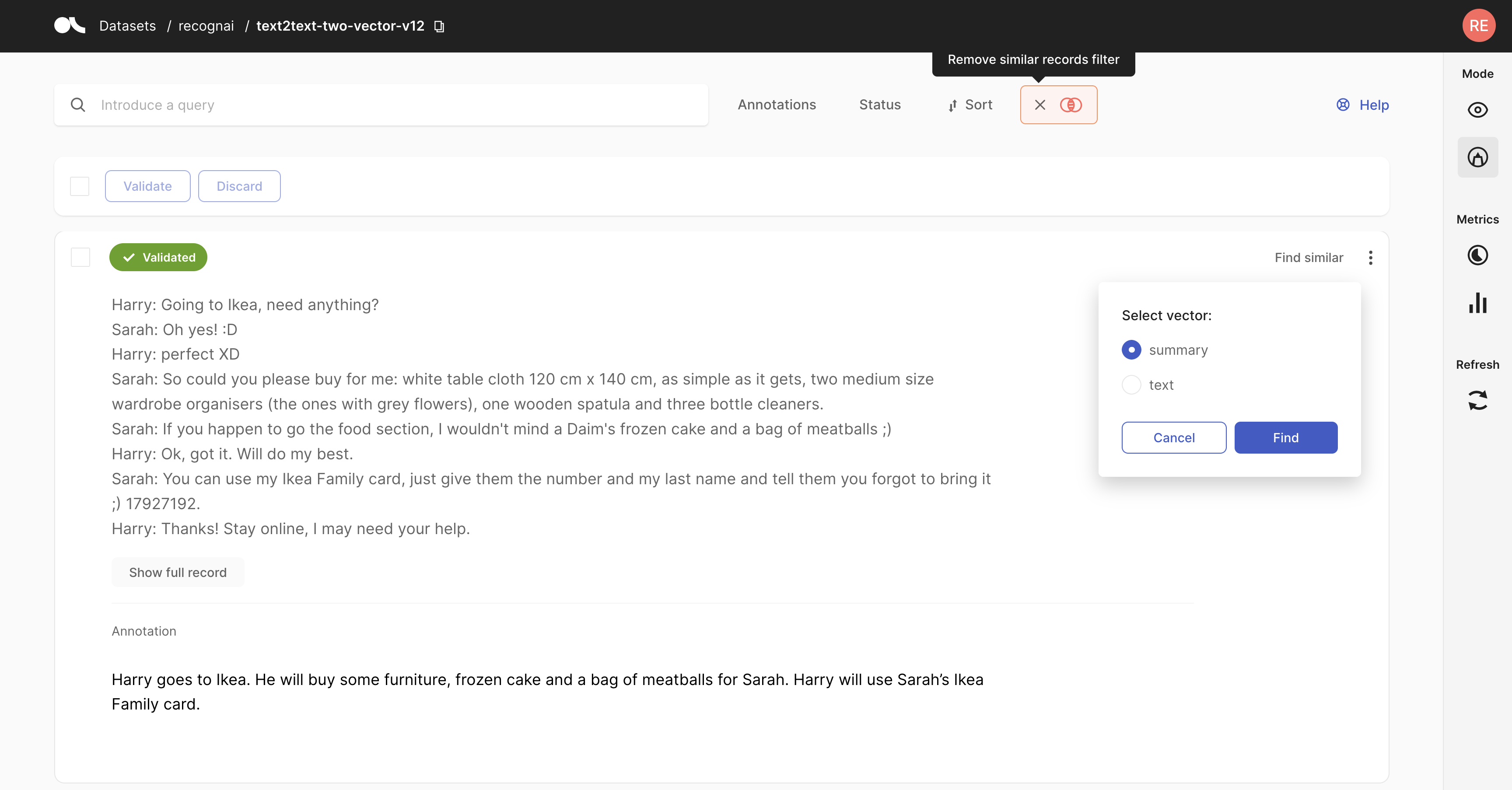
Within the Argilla UI, it is possible to select a record that has an attached vector to start semantic searching by clicking the “Find similar” button. After labelling, the “Remove similar record filter” button can be pressed to close the specific search and continue with your labeling session.
Argilla Python client#
The rg.load methods includes a vector parameter which can be used to retrieve similar records to a given vector, and a limit parameter to indicate the number of records to be retrieved. This parameter accepts a tuple with the key of the target vector (this should match with one of the keys of the vectors dictionary) and the query vector itself.
Warning
In order to get good results, make sure you are using the same encoder model for generating the vector used for the query. For example, if your dataset has been encoded with the all-MiniLM-L6-v2 model from sentence transformers, make sure to use the same model for encoding the text to be used for querying. Another option is to use an existing record in your dataset, which already contains a vector.
Sentence Transformers#
Let’s see how to retrieve similar records using the dataset created in the previous section:
[ ]:
from sentence_transformers import SentenceTransformer

encoder = SentenceTransformer("all-MiniLM-L6-v2", device="cpu")

# Let's use a user query about a lost credit card
embedding = encoder.encode("I lost my credit card. What should I do?")

ds = rg.load(
    name="banking77",
    vector=("mini-lm-sentence-transformers", embedding.tolist()),
    limit=20,
)
If the query and vectors are working correctly, we should find queries with a similar topic or intent, and potentially the same label. Let’s show the results in a table using the to_pandas() method:
[90]:
ds.to_pandas()[["text", "annotation"]]
[90]:
| text | annotation | |
|---|---|---|
| 0 | What should I do if I lost my card? | lost_or_stolen_card |
| 1 | My card is lost! What do I do now? | lost_or_stolen_card |
| 2 | My card is lost! What can I do? | lost_or_stolen_card |
| 3 | I still don't have my card after 2 weeks. Wha... | card_arrival |
| 4 | Somehow I am missing my card. What should I do? | lost_or_stolen_card |
| 5 | I believe my card has been stolen, what can I ... | lost_or_stolen_card |
| 6 | I lost my card | lost_or_stolen_card |
| 7 | What should I do if my card is missing? | lost_or_stolen_card |
| 8 | How do I report my card lost or stolen? | lost_or_stolen_card |
| 9 | My card is broke, what do I do? | card_not_working |
| 10 | Oh no! I lost my card! Help! | lost_or_stolen_card |
| 11 | I'm starting to think my card is lost because ... | card_arrival |
| 12 | I know I have enough funds in my account but m... | declined_card_payment |
| 13 | I lost my wallet today with all my credit card... | lost_or_stolen_card |
| 14 | I cannot find my credit card. | lost_or_stolen_card |
| 15 | If my card payment is cancelled, what should I... | reverted_card_payment? |
| 16 | I ordered a card and I still haven't received ... | card_arrival |
| 17 | Somebody has stolen my card, I need help please. | lost_or_stolen_card |
| 18 | I was getting cash and can't get my card back. | card_swallowed |
| 19 | What do I do if it says my card payment has be... | reverted_card_payment? |
Using the query param#
The vector param can be combined with the query param to combine vector search with traditional search. Let’s see a further example: find the most similar records with the card_arrival label. To do this we use the Query string DSL described in the Queries guide.
[155]:
from sentence_transformers import SentenceTransformer

encoder = SentenceTransformer("all-MiniLM-L6-v2", device="cpu")

# Let's use a user query about a lost credit card
embedding = encoder.encode("I lost my credit card. What should I do?")

ds = rg.load(
    name="banking77",
    vector=("mini-lm-sentence-transformers", embedding.tolist()),
    limit=20,
    query="annotated_as:card_arrival"
)
In the table below we can see that the first example is a mixed between a lost_or_stolen and card_arrival.
[160]:
import pandas as pd

pd.set_option('display.max_colwidth', None)

ds.to_pandas()[["text", "annotation"]]
[160]:
| text | annotation | |
|---|---|---|
| 0 | I'm starting to think my card is lost because it still hasn't arrived, can you help? | card_arrival |
| 1 | I think something went wrong with my card delivery as I haven't received it yet. | card_arrival |
| 2 | I still have not received my new card, I ordered over a week ago. | card_arrival |
| 3 | I have been waiting longer than expected for my bank card, could you provide information on when it will arrive? | card_arrival |
| 4 | I ordered a card and I still haven't received it. It's been two weeks. What can I do? | card_arrival |
OpenAI Embeddings#
Let’s do the same with our OpenAI Embeddings.
[144]:
vector = openai.Embedding.create(
    input = ["I lost my credit card. What should I do?"],
    model="text-similarity-ada-001"
)["data"][0]["embedding"]


ds = rg.load(
    name="banking77-openai",
    vector=("text-similarity-ada-001", vector),
    limit=20,
)
[145]:
ds.to_pandas()[["text", "annotation"]]
[145]:
| text | annotation | |
|---|---|---|
| 0 | What should I do if I lost my card? | lost_or_stolen_card |
| 1 | My card is lost! What do I do now? | lost_or_stolen_card |
| 2 | My card is lost! What can I do? | lost_or_stolen_card |
| 3 | What should I do if my card is missing? | lost_or_stolen_card |
| 4 | Somehow I am missing my card. What should I do? | lost_or_stolen_card |
| 5 | My card is broke, what do I do? | card_not_working |
| 6 | I still don't have my card after 2 weeks. Wha... | card_arrival |
| 7 | How do I deal with a stolen card? | lost_or_stolen_card |
| 8 | I believe my card has been stolen, what can I ... | lost_or_stolen_card |
| 9 | How do I report my card lost or stolen? | lost_or_stolen_card |
| 10 | How do I report my card stolen? | lost_or_stolen_card |
| 11 | I ordered my card 2 weeks ago and it still isn... | card_arrival |
| 12 | I ordered a card a week ago, and it's still no... | card_arrival |
| 13 | My card appears to be broken how can I fix it? | card_not_working |
| 14 | How do I report a stolen card? | lost_or_stolen_card |
| 15 | I received my new card, but I don't see it in ... | card_linking |
| 16 | I cannot find my credit card. | lost_or_stolen_card |
| 17 | Somebody has stolen my card, I need help please. | lost_or_stolen_card |
| 18 | my card was not in the mail again can you advise? | card_delivery_estimate |
| 19 | How can I resolve a problem where my card won'... | card_not_working |
co:here co.Embed#
Let’s do the same with our Cohere embeddings.
[126]:
vector = co.embed(["I lost my credit card. What should I do?"], model="small").embeddings[0]

ds = rg.load(
    name="banking77-cohere",
    vector=("cohere-embed", vector),
    limit=20,
)
[127]:
ds.to_pandas()[["text", "annotation"]]
[127]:
| text | annotation | |
|---|---|---|
| 0 | What should I do if I lost my card? | lost_or_stolen_card |
| 1 | My card is lost! What do I do now? | lost_or_stolen_card |
| 2 | My card is lost! What can I do? | lost_or_stolen_card |
| 3 | Help me please! My card was stolen! | lost_or_stolen_card |
| 4 | Oh no! I lost my card! Help! | lost_or_stolen_card |
| 5 | Help. I have a stolen card! | lost_or_stolen_card |
| 6 | I can't find my card and think it may have bee... | lost_or_stolen_card |
| 7 | Somebody has stolen my card, I need help please. | lost_or_stolen_card |
| 8 | I believe my card has been stolen, what can I ... | lost_or_stolen_card |
| 9 | How do I report my card lost or stolen? | lost_or_stolen_card |
| 10 | Help! Someone stole my card! | lost_or_stolen_card |
| 11 | I still don't have my card after 2 weeks. Wha... | card_arrival |
| 12 | I think my card was stolen. | lost_or_stolen_card |
| 13 | I believe my credit card was stolen. | lost_or_stolen_card |
| 14 | Somehow I am missing my card. What should I do? | lost_or_stolen_card |
| 15 | How do I deal with a stolen card? | lost_or_stolen_card |
| 16 | I cannot find my credit card. | lost_or_stolen_card |
| 17 | I lost my card | lost_or_stolen_card |
| 18 | My card got stolen! | lost_or_stolen_card |
| 19 | My card is broke, what do I do? | card_not_working |